
iDisplay - Get APK
You'll be able to download in few seconds.
Publisher Description
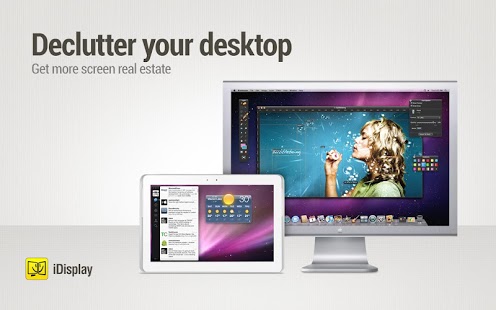
Turn your Android tablet or phone into an additional display for your Mac or Windows computer. Increase your personal productivity by extending your computer screen! Perfect tool for multi-taskers, iDisplay lets you use your Android device as an interactive wireless display to give you more screen real estate.
"And you go "Oh man! Yes!” That´s brilliant.” - Engadget
"I mean, I can think of about a billion uses for this." - TechCrunch
Why choose iDisplay over a hardware monitor?
- Your Android device can be your secondary display
- Works with both Mac and Windows computers
- iDisplay lets you interact with your additional display: move objects, draw, control playback
- Zoom and Pan your desktop right on your Android
- Easily switch between portrait and landscape screen orientations: simply rotate your device and it will adjust automatically
- Extend Display / Mirror Display Modes
- Works perfectly with any Android screen resolution
For Twitch, Hitbox, Youtube streamers:
Use iDisplay to extend your streaming setup. Use iDisplay as a second or even a third monitor and have more space on your main monitor! Example: Move OBS, CoreTemp, Chat and Views on iDisplay.
iDisplay is of a great value in duet with VR glasses:
- Get VR glasses
- Install iDisplay Desktop on your PC
- Install iDisplay on your Android Tablet
- Open the game that support VR on your PC (DCS World, for example). Go to options and select stereo from monitor dropdown. Apply settings.
- Enjoy your setup!
COMPATIBILITY:
Android OS up to 7.1 Nougat
macOS
iDisplay Desktop application needs to be installed on your Mac.
iDisplay Desktop is free and can be downloaded anytime at getidisplay.com
iDisplay is compatible with Macs with Intel CPUs running on Mac OS X 10.9 and later.
Windows
iDisplay Desktop application needs to be installed on your PC.
iDisplay Desktop is free and can be downloaded anytime at getidisplay.com
iDisplay is compatible with Windows XP (32-bit only), Windows Vista (32- and 64-bit) , Windows 7 (32- and 64-bit), Windows 8, Windows 10
On Windows, iDisplay can be used as Additional or Extended monitor, single-window mode is not yet supported.
For Windows Vista and Windows 7 "Aero" theme may be disabled when connected to iDisplay and will be re-enabled upon disconnection).
Follow us on Twiter: @idisplayapp
NETWORK CONNECTIVITY
Your computer and Android must be connected to the same Wi-Fi network.
Keywords: idisplay, display, second monitor, second display, secondary display, extra display, monitor, vr, vr games, vr display, vr monitor, cardboard, gamers, stream, additional display, mirror, mirroring, duet, dual, second monitor setup, productivity, idisplayapp, dual monitor, video streaming,wireless display, remote monitor, remote display, extended display, screen extender, monitor extender, screen mirroring, multi monitor, multi display, wifi display, wifi monitor, Twitch, Hitbox, streaming monitor, streaming display, twitch monitor
About iDisplay
The company that develops iDisplay is SHAPE GmbH. The latest version released by its developer is 1.0 .
To install iDisplay on your Android device, just click the green Continue To App button above to start the installation process. The app is listed on our website since 2018-05-16 and was downloaded 0 times. We have already checked if the download link is safe, however for your own protection we recommend that you scan the downloaded app with your antivirus. Your antivirus may detect the iDisplay as malware as malware if the download link to com.idisplay.virtualscreen is broken.
How to install iDisplay on your Android device:
- Click on the Continue To App button on our website. This will redirect you to Google Play.
- Once the iDisplay is shown in the Google Play listing of your Android device, you can start its download and installation. Tap on the Install button located below the search bar and to the right of the app icon.
- A pop-up window with the permissions required by iDisplay will be shown. Click on Accept to continue the process.
- iDisplay will be downloaded onto your device, displaying a progress. Once the download completes, the installation will start and you'll get a notification after the installation is finished.
Program Details
System requirements
Download information
Pricing
Version History
version Varies with device
posted on 2018-05-16
Bug fixes and improvements
version 3.0.1
posted on 2013-08-12
Version 3.0.1:,- Support for x86-based Android devices,Version 3.0:,- Updated UI,- Option "Start application" which allows to start an application directly on iDisplay,- Option to move windows to iDisplay with one tap with "Show windows" feature,Version 2.5.0,- Sound transferring ,- Correct displaying of the main screen proportions.,Version 2.4.4,- Scroll with 2 fingers,Version 2.4.2,- Faster app performance on devices with single-core CPUs,- Faster image rendering on hi-res displays
version 1.1
posted on 2011-04-12
Several fixes and updates
Disclaimer
External Download
We do not host iDisplay on our servers. We did not scan it for viruses, adware, spyware or other type of malware. This app is hosted by Galad and passed their terms and conditions to be listed there. We recommend caution when installing it.
The APK Download link for iDisplay is provided to you by apps112.com without any warranties, representations or guarantees of any kind, so access it at your own risk.
If you have questions regarding this particular app contact the publisher directly. For questions about the functionalities of apps112.com contact us.
